
 Contact





At BigBuy, we want you to have maximum control and autonomy over your order management. That’s why we offer you the possibility to schedule the validation of your orders and easily cancel them within that same time frame.
Follow this quick guide to make the most of this feature.
What will you gain by activating it?
- More flexibility to cancel without tickets or waiting.
- More time to review details before shipping.
- More autonomy to manage everything at your own pace.
Schedule my orders
- Access your Control Panel: Orders > Settings.
- In the “Schedule your orders” section, select your preferred delay time from the available options (between 1h and 24h).
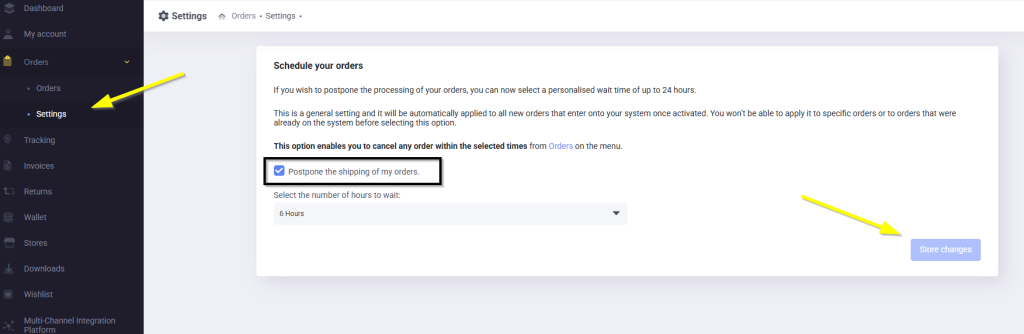
IMPORTANT:
During the selected delay, the order remains on hold with the status “Scheduled”. During this time, you can cancel it if needed.

Cancel my orders
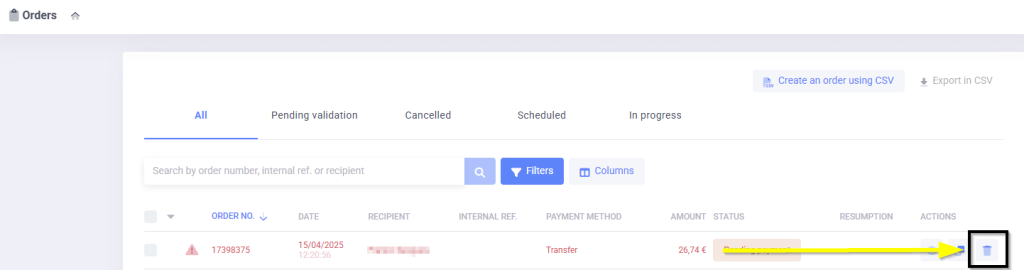
- Access your Control Panel in the “Orders” section.
- Select an order number and click on Cancel.
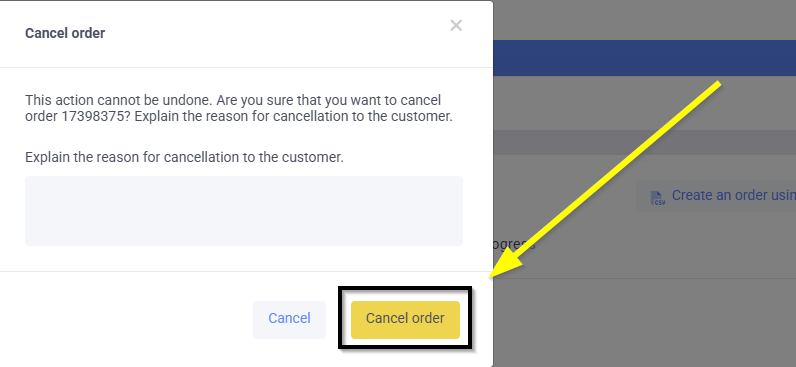
- You will receive a cancellation confirmation by email.
- The refund will be processed automatically.
When is this functionality useful?
- Your end customer changes their mind.
- Your end customer cancels via the marketplace.
- You detect potential fraud in the order.
- There is an error in the order details.
- A product is missing from the order.
✅With this option, you have full control over your orders!
IMPORTANT:
If you do not schedule your orders, you will not be able to cancel them once processed, nor request cancellation from the logistics department.