
 Contact





Once you have a marketplace sales channel connected to the multichannel and have received an order, you can check within the multichannel to see if the order has already been imported.
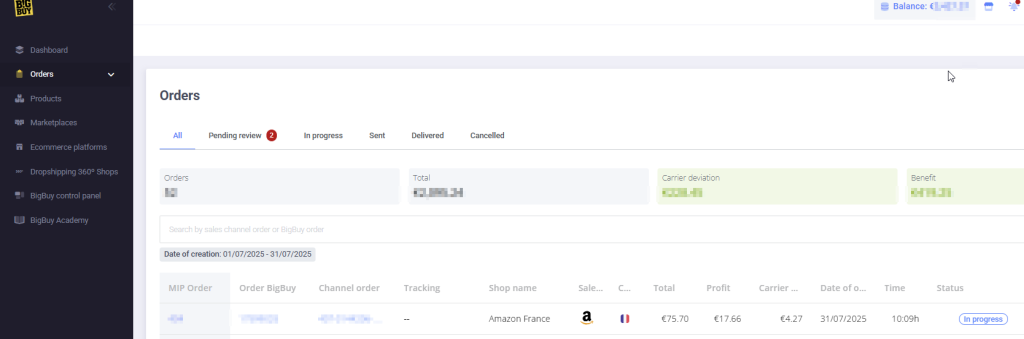
If you can’t find the order we received in the marketplace, you can try to retrieve it manually using the multichannel tool.
Make sure the order you are checking has a bigbuy product provided by the multichannel and that the selling channel is connected normally.
First, click on the drop-down menu of the orders option to open the Configuration section.
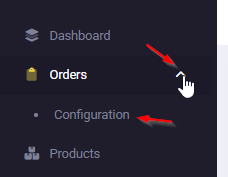
Within this new section you must perform the following steps
- Click on the option to recover manual orders
- Choose the sales channel that corresponds to this order
- Enter the order number as it appears in the marketplace and click on the Recover button.
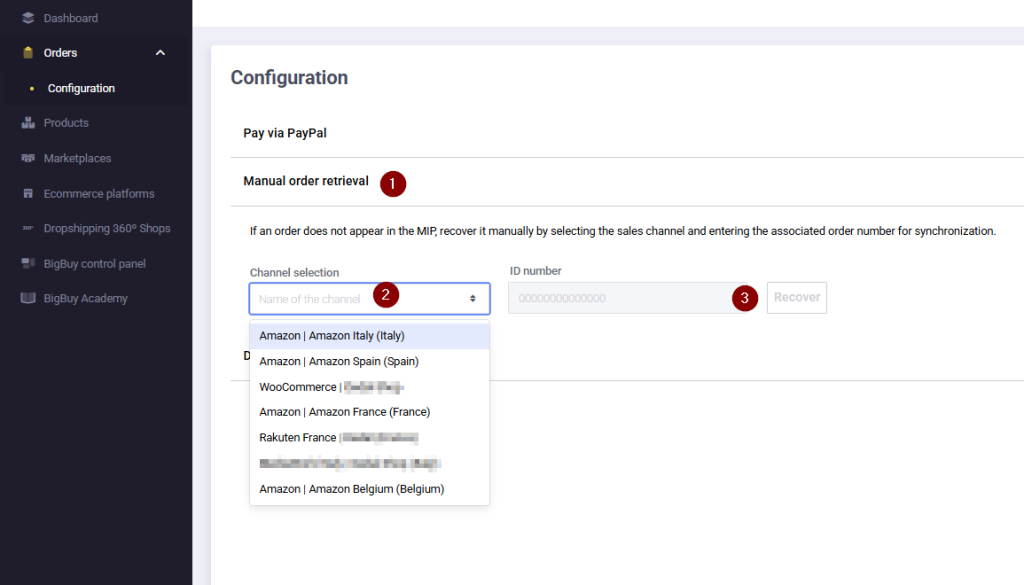
This will make a request to your sales channel to attempt to obtain the specified order. Please note that the marketplace may take up to 30 minutes to process the request, and therefore, the order will take a while to appear in the Orders section.
Please note that if you have multiple orders assigned, you will be able to perform a manual retrieval every 15 minutes.
If after this period the order has not appeared in the multi-channel, you can contact our technical support team (specifying what you did, your internal order number, and the sales channel), who will review your specific case.